
Resources
Explore podcasts, videos, blogs, and webinars for inspiration and expert advice. Our extensive library is for everyone from beginners looking for a step-by-step guide through their first project or seasoned pros seeking fresh ideas and inspiration. We cover the topics you care about like technical tips and FAQs, interviews with industry stand-outs, and equipment comparisons and tours. Dive into our library and expand your knowledge today!
Go Back To ResourcesFAQ's and Information for Sign-Making
Braille Pen Repair FAQ’s
Complete the Raster® braille pen form and send to the below address.
Send to:
Accent Signage Systems
Attn: Braille Department
5409 Hamlet Dr.
Findlay, OH 45840
Simple repairs cost $80, more complex repairs cost $300.
Email braille@accentsignage.com for a quote on how much your repair will cost.
We know you need your equipment to complete projects, and that’s why we’re dedicated to getting your repairs done as quickly as possible. For the latest model of our Raster® pen, repairs typically take 3-5 business days depending on the issue. Older models of our Raster® pen (serial numbers beginning with “D” or “G”) can take between 7-10 business days to repair depending on the issue and part availability.
Yes. We can help if you need a loaner Raster® pen while yours is being repaired. Call 800-869-7800 or email braille@accentsignage.com to request a loaner during your repair time.
Serial numbers are found on the bracket of the Raster® pen as seen in the photo below.
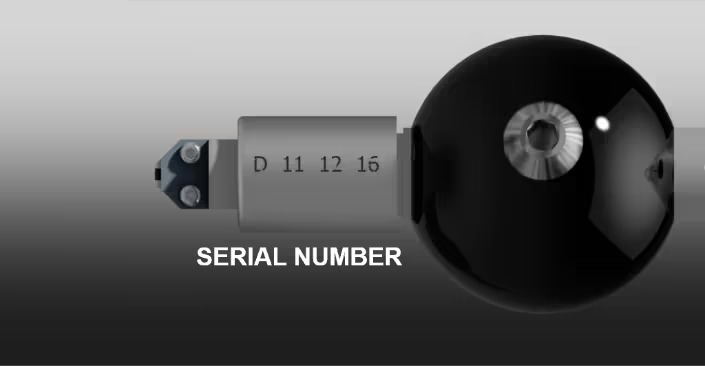
Customers are responsible for the cost of shipping unless repairs are needed within the first 30 days of purchase.
All repairs covered are under the first year of warranty and under the extended warranties (only applicable if an extended warranty is purchased). Customers are responsible for the cost of shipping unless repairs are needed within the first 30 days from date of purchase.
Browse More FAQ's and Resources
Go Back To ResourcesBrowse FAQ's and information by
Technology
- Common questions
- Helpful instructions
- Resources & guides
- Tips and tricks
- Equipment information
Browse FAQ's and information by
Customer Service
- Payment options & financing
- Exchanges & returns
- General common questions
- Shipping & delivery
- Track my order
Browse our
Resources
- How-to videos
- Helpful blog posts
- Product guides
- Meet our support team
- And more!
Free Personalization Resources to Help You Create Like a Pro
Our free resources are here to help you create confidently! You'll find everything from laser engraving ideas to sublimation heat press settings in our ever-expanding collection of blogs, how-to-videos, free artwork downloads, tech tips, and templates.
In addition to high-quality blanks, supplies, and equipment, our free resources help you work faster, learn new techniques, and take your personalization or signage business to the next level! Whether you're looking for tips and tricks for sublimation, laser engraving, rotary engraving, UV printing, DTF, or DTG - you've come to the right place!
Educational Videos
Our video library offers creators and sign-makers quick tutorials, expert product demonstrations, and creative inspiration for laser engraving and more. Explore topics like:
- How to use new equipment like the Epson F170 or Flux Beambox II
- How to make acrylic earrings
- Sublimation how-to videos
- The best materials to create high-quality signage and promotional products
New videos are uploaded regularly to keep up with new trends and technologies.
Tech Tips & Templates
Design with confidence using our downloadable product templates and material-specific tech tips. Each resource includes:
- Exact product dimensions and bleed areas
- Recommended print or engraving settings
- Mug press and heat press settings with time, temperature, and pressure
- Step-by-step setup instructions and tips for the personalization process
Perfect for sublimation blanks, laserable materials, UV-print ready items, and more, these free downloads help reduce waste and improve production speed.
Creative Inspiration
Looking for creative ideas for your laser engraver, UV-printer, or more? Our blog and featured project pages give you real-world applications and tips for:
- Craft fairs and gift businesses
- Personalized home décor
- Custom signage and awards
Additional resources include:
- Artwork downloads
- Product guides
- E-catalogs
- Samples and material binders
FAQ & Troubleshooting
- Material compatibility, including how to use double colored plastic for engraving
- File prep and formatting
- Maintenance for printers and engravers with help from our Customer Success Team
Follow Us On
Social Media
for the latest trending products,
inspiration, tips, tricks and more!
@johnsonplasticsplus