
Resources
Explore podcasts, videos, blogs, and webinars for inspiration and expert advice. Our extensive library is for everyone from beginners looking for a step-by-step guide through their first project or seasoned pros seeking fresh ideas and inspiration. We cover the topics you care about like technical tips and FAQs, interviews with industry stand-outs, and equipment comparisons and tours. Dive into our library and expand your knowledge today!
Go Back To ResourcesFAQ's and Information for Technology
DTF Printing FAQs
Direct-to-film (DTF) printing is a digital printing process that transfers vibrant, full-color designs directly on to a special film before applying them to a wide range of fabrics using heat and pressure. The process involves printing the design onto the film with specialized DTF inks, coating it with adhesive powder, and then curing it before pressing it onto the garment.
DTF printing stands out for its versatility, it works on cotton, polyester, blends, and even dark fabrics—and for producing durable, detailed prints with a soft feel. It’s an excellent choice for small businesses or shops that need high-quality custom apparel without the setup costs of traditional screen printing. Check out our buyer’s guide to learn how to get started with DTF printing.
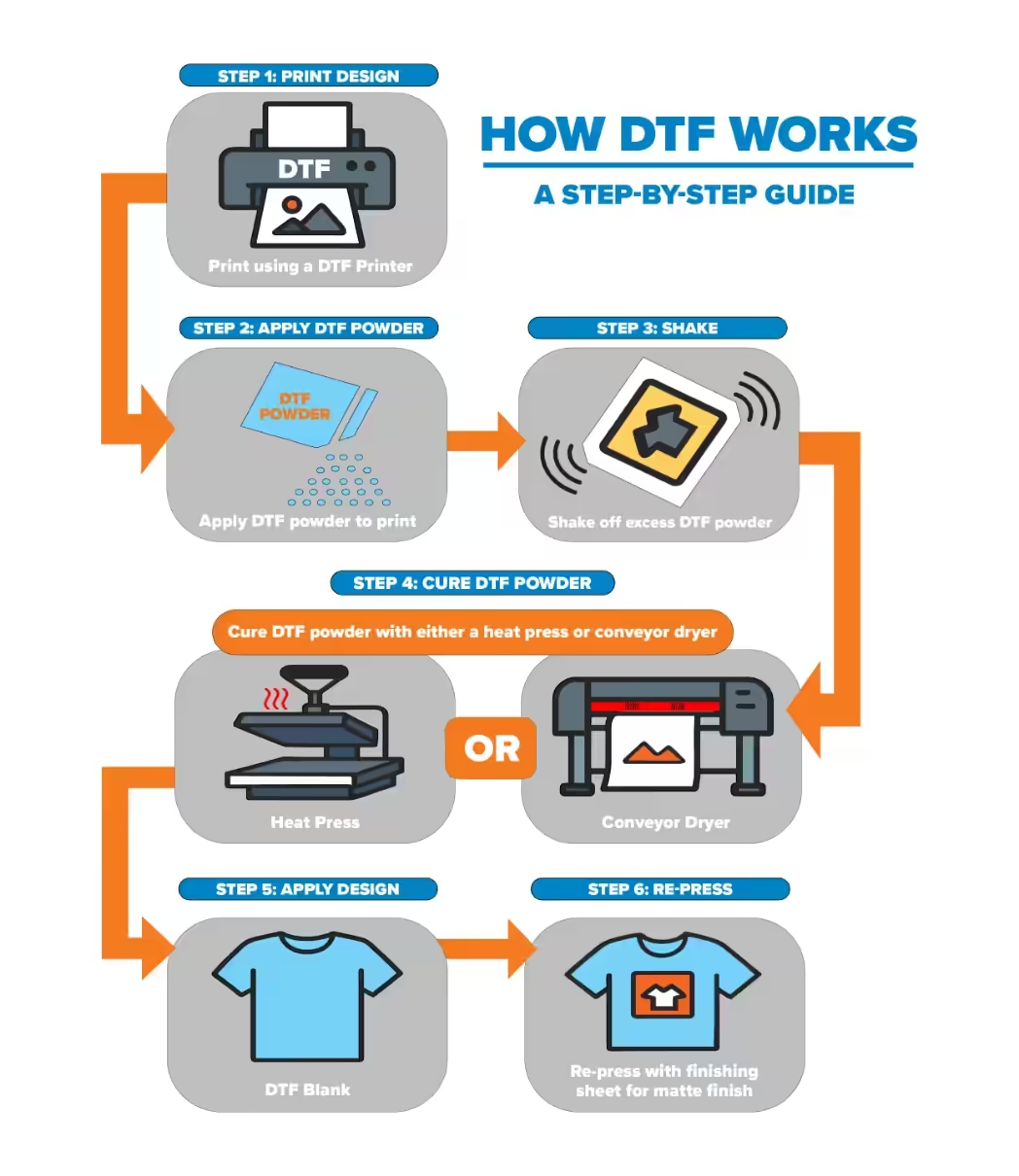
The direct-to-film (DTF) printing process is a simple yet effective method for creating vibrant, durable designs on a variety of materials. Follow these key steps to see how a printed design is transformed into a ready-to-press transfer.
- Print design using a DTF printer.
- Apply DTF powder to print.
- Shake off excess DTF powder.
- Cure DTF powder using a heat press or conveyor dryer.
- Apply design to DTF blank.
- Re-press with finishing sheet for matte finish.
Reference the step-by-step guide below for more information or download guide here.
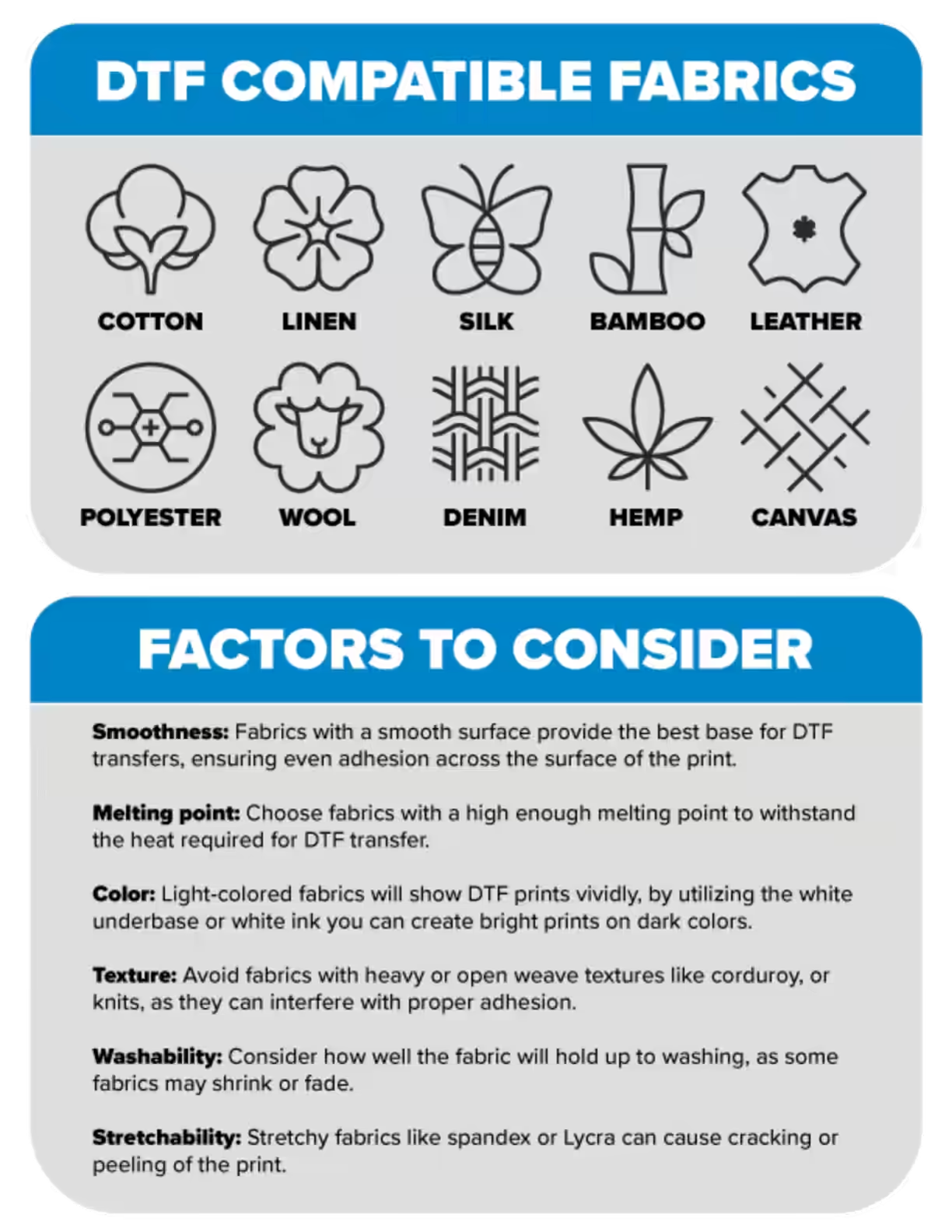
Direct-to-film (DTF) printing offers multiple advantages, including high print quality with vibrant colors and intricate details, material versatility, and durability.
- Superior print quality: DTF printing excels at reproducing vibrant colors and intricate designs, including fine lines and small text, with high accuracy and clarity.
- Versatility: DTF can be used on a wide variety of fabrics, including cotton, polyester, linen and many more. In addition, DTF transfer can be applied to any color of material.
- Durability: DTF transfers are known for their durability, resisting cracking, peeling, and fading. Capable of withstanding numerous washes without significant degradation, making them suitable for everyday items.
- Ease of use: When compared to screen printing, DTF printing simplifies the production process, requiring less manual intervention and specialized knowledge. DTF printing also eliminates the need for fabric pre-treatment, saving time and resources.
For more information on how DTF printing could benefit your business, fill out this form.
While DTF (direct-to-film) powder itself isn’t classified as toxic, the use of it in DTF printing can have several workplace hazards. Below we cover some of the potential hazards, and the safety precautions you can implement to maintain a safe work environment.
Potential Hazards
- Inhalation: DTF powder can become airborne during application, posing a respiratory hazard if inhaled in large quantities or over extended periods. Prolonged exposure could lead to irritation in sensitive individuals.
- Skin and eye contact: Direct contact with DTF powder may cause mild skin or eye irritation individuals with sensitive skin, or preexisting skin conditions.
- MDI vapors: Heating some DTF powders, particularly those made with thermoplastic polyurethane, can release MDI (Methylene Diphenyl Diisocyanate) vapors, which can cause respiratory irritation when inhaled.
Safety Precautions
- Ventilation: Always work in a well-ventilated area and use a fume extraction system to remove airborne particles and fumes, especially during the powder application and curing processes.
- Respiratory protection: Wear a dust mask or respirator to protect your lungs from inhaling DTF powder.
- Protective eyewear: Use a face shield or goggles to prevent eye irritation from airborne powder.
- Gloves: Wear gloves, such as nitrile or latex, to protect your skin from direct contact with the DTF powder.
- Hygiene: Wash your hands thoroughly after handling the powder and avoid eating or drinking near the printing area.
- Material safety data sheets (MSDS): Obtain and review the MSDS for all DTF materials you use to understand their specific hazards and recommended safety precautions.
In this step-by-step tutorial, Britany walks you through how to use Epson Garment Creator software for both direct-to-garment (DTG) and direct-to-film (DTF) printing applications. She’ll demonstrate how to select the best print settings for your print job, adjust for optimal print quality, and fine-tune ink density and white ink layering for the best possible print!
You’ll also learn how easy it is to switch the Garment Creator software between DTG and DTF modes, save your projects for efficient production, and access the software’s additional tools like the Epson Print Cost Estimator to help manage material expenses.
This video will help you feel confident using your Epson F1070 whether you’re just getting started with DTF/DTG printing or looking to optimize your workflow. Watch now and explore the full line of Epson printers, inks, and print-ready blanks available at JPPlus.com to start or grow your custom apparel business today!
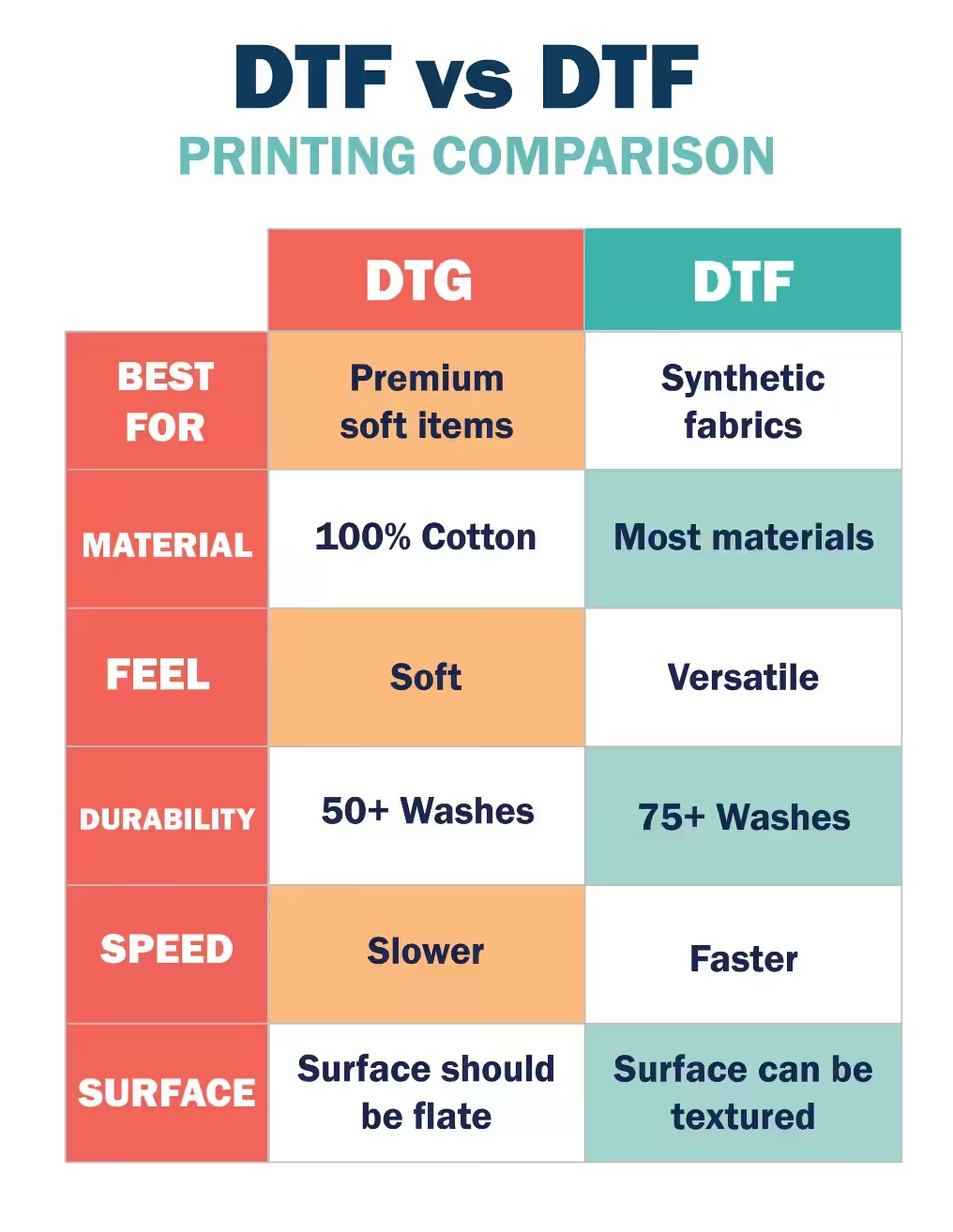
Although DTF (direct-to-film) and DTG (direct-to-garment) both use advanced digital printing technologies, the way each method transfers ink and the materials they work best on are different. DTG prints directly onto garments for a softer finish, whereas DTF uses a film transfer process that improves durability and flexibility across more fabric types. Here’s a quick side-by-side look at the key differences to help you choose the best fit for your project.
Browse More FAQ's and Resources
Go Back To ResourcesBrowse FAQ's and information for
Sign-Making
- Braille system repairs
- Blade resharpening
- Accent Signage Systems
- ADA sign-making troubleshooting
- Common ADA questions
Browse FAQ's and information by
Customer Service
- Payment options & financing
- Exchanges & returns
- General common questions
- Shipping & delivery
- Track my order
Browse our
Resources
- How-to videos
- Helpful blog posts
- Product guides
- Meet our support team
- And more!
Free Personalization Resources to Help You Create Like a Pro
Our free resources are here to help you create confidently! You'll find everything from laser engraving ideas to sublimation heat press settings in our ever-expanding collection of blogs, how-to-videos, free artwork downloads, tech tips, and templates.
In addition to high-quality blanks, supplies, and equipment, our free resources help you work faster, learn new techniques, and take your personalization or signage business to the next level! Whether you're looking for tips and tricks for sublimation, laser engraving, rotary engraving, UV printing, DTF, or DTG - you've come to the right place!
Educational Videos
Our video library offers creators and sign-makers quick tutorials, expert product demonstrations, and creative inspiration for laser engraving and more. Explore topics like:
- How to use new equipment like the Epson F170 or Flux Beambox II
- How to make acrylic earrings
- Sublimation how-to videos
- The best materials to create high-quality signage and promotional products
New videos are uploaded regularly to keep up with new trends and technologies.
Tech Tips & Templates
Design with confidence using our downloadable product templates and material-specific tech tips. Each resource includes:
- Exact product dimensions and bleed areas
- Recommended print or engraving settings
- Mug press and heat press settings with time, temperature, and pressure
- Step-by-step setup instructions and tips for the personalization process
Perfect for sublimation blanks, laserable materials, UV-print ready items, and more, these free downloads help reduce waste and improve production speed.
Creative Inspiration
Looking for creative ideas for your laser engraver, UV-printer, or more? Our blog and featured project pages give you real-world applications and tips for:
- Craft fairs and gift businesses
- Personalized home décor
- Custom signage and awards
Additional resources include:
- Artwork downloads
- Product guides
- E-catalogs
- Samples and material binders
FAQ & Troubleshooting
- Material compatibility, including how to use double colored plastic for engraving
- File prep and formatting
- Maintenance for printers and engravers with help from our Customer Success Team
Follow Us On
Social Media
for the latest trending products,
inspiration, tips, tricks and more!
@johnsonplasticsplus